
Magento 2.4.6 left regular support on 11 August 2026. The steps below still apply to that release. The newest release is Magento 2.4.9, and our Magento upgrade service moves stores to it.
To upgrade Magento to 2.4.6, move PHP to 8.1 or 8.2, confirm your extensions and customizations support 2.4.6, then run composer require-commerce magento/product-community-edition 2.4.6 --no-update --force-root-updates followed by composer update.
Plan time for theme templates affected by jQuery 3, for Zend classes replaced by Laminas equivalents, and for PHP 8 warnings that are now treated as errors.
After the upgrade, test checkout, payment processing and every custom integration.
Why Upgrade to Magento 2.4.6?
This latest version includes important security updates, bug fixes, and performance improvements that will enhance your customers’ shopping experience and protect your store from potential threats.
Additionally, upgrading to Magento 2.4.6 ensures that your store is compatible with the latest technologies and integrations, allowing you to stay ahead of the competition.
Before you start upgrading Magento 2
Make sure that you have access to credentials for payment gateways, SMTP and all integrations that your Magento store use. Keep in mind that API keys for the majority of extensions are encrypted. In case of the plugin update that might have changed configuration paths you can’t extract them from previous configuration. One of the examples is Klarna Payments module that has been removed from the core Magento 2 and is now a standalone module.
Magento 2.4.6 System Requirements
The latest version of Magento 2, comes with a few significant changes - it no longer supports PHP 7.4, and instead recommends the use of PHP 8.2. This means that if you’re running Magento on PHP 7.4, you’ll need to upgrade to PHP 8.1 or 8.2 to continue using the latest version of Magento.
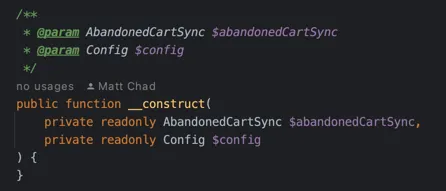
PHP 8 doesn’t just improve performance, it also introduces some game-changing features like constructor property promotion. This new feature drastically reduces the amount of boilerplate code, resulting in code of higher quality. With less code to write, there are fewer opportunities for bugs to creep in.
However, if you’re using New Relic monitoring, it’s important to note that it does not yet support PHP 8.2. Therefore, you should not update PHP beyond the version 8.1 until New Relic release around Summer 2023.
Update: This New Relic release has introduced the support for PHP 8.2.
Another change in Magento 2.4.6 is its compatibility with MariaDB 10.6 which was not officially available and would break installation on previous Magento versions.
Redis 6 is approaching its end-of-life in 2024, but there’s good new: Redis 7.0 is fully compatible with the latest Magento releases and can be used without any issues.
Updates regarding ElasticSearch and OpenSearch will be detailed in the following sections.
New features
The latest version of Magento comes with several exciting changes and improvements that are sure to enhance the store performance.
A new email validation can be enabled whenever an admin user modifies their email. This feature will ask for email verification each time the admin user request change of their email address.
As usual, this release includes previous security patches.
Native SMTP configuration without module
You can configure SMTP for Magento 2.4.6 and above directly from the admin panel. Previously, merchants often resorted to third-party extensions such as Mageplaza SMTP, which also offers customer tracking integrations that may not be necessary for your store.
To configure SMTP in Magento 2.4.6, head to Stores -> Settings -> Configuration -> Advanced -> System.
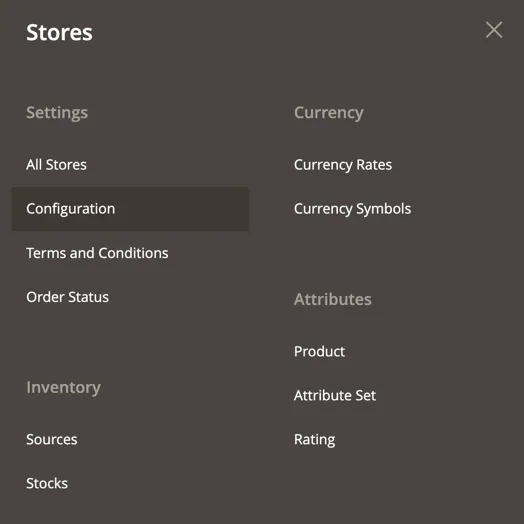
There you can find Mail Sending Settings tab with SMTP mail sending parameters.
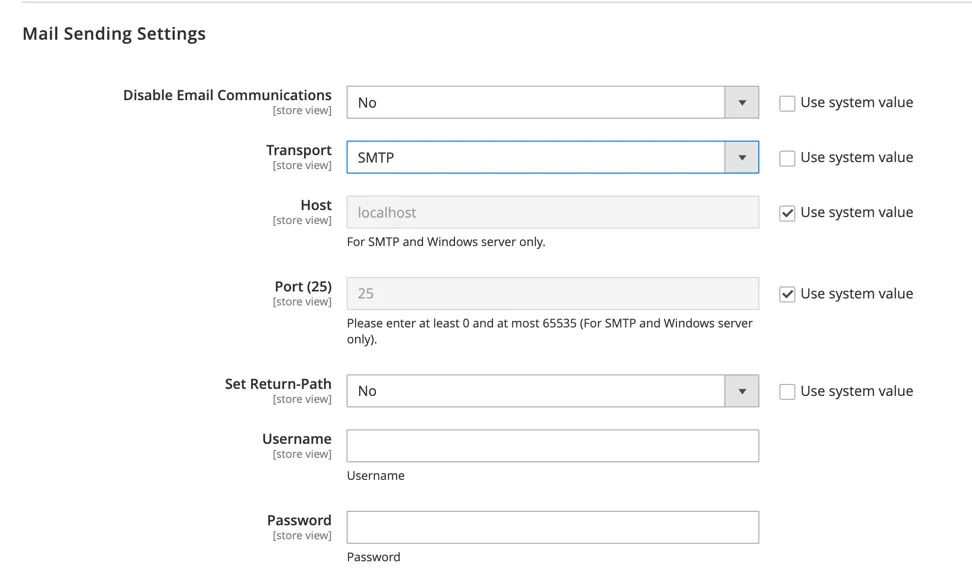
Enter your SMTP provider details such as username, password, and hostname. Then save the configuration and flush the Magento 2 cache.
ElasticSearch and Open Search support in Magento 2.4.6
This release brings support to ElasticSearch 8 and OpenSearch 2.5.
Magento Open Source has recently announced that it now includes OpenSearch as its default search engine for both on-premises and cloud deployments. Additionally, OpenSearch is now available as a standalone search engine. This latest release is fully compatible with OpenSearch v2.x and also backward-compatible with OpenSearch v1.
Learn more on how to upgrade ElasticSearch instances from the official documentation.
If you rely on Smile ElasticSuite, there is version 2.11 available for Magento 2.4.6.
Updating Your Extensions and Customizations
One of the most important steps in upgrading to Magento 2.4.6 is ensuring that your extensions and customizations are compatible with the new version.
Before upgrading, check with the developers of your extensions and customizations to see if they have updates available for Magento 2.4.6. If they do not, you may need to find alternative solutions or hire a developer to update them for you.
It’s important to note that using outdated extensions and customizations can cause compatibility issues and potentially harm your store’s functionality.
Frontend library jQuery upgraded to the version 3
You will have to review theme and template overrides. It is necessary to ensure that all tags such as <div></div> are closed properly, rather than using the self-closing tag <div />.
If tags like <p/> and <span/> are present in an HTML string, the browser will interpret them as <p><span>.
Unlike <img />, elements <p> and <span> are not self-closing tags.
The browser will only close these tags at the end of the string or when it encounters an element that cannot be contained within the current element.
Therefore, if another <p> tag appears, it will close the previously opened <p> tag.
Learn more about migration on the jQuery page in the upgrade guide.
You might come across additional jQuery deprecation errors, such as:
Uncaught TypeError: $.ajax(...).success is not a functionAgain, review the changes in your themes files with the current source code for Magento 2 *.html and *.phtml templates.
Zend classes replaced in Magento 2.4.6
The latest versions of Magento have introduced several neat improvements. One of the most notable changes is the replacement of Zend classes with Laminas equivalents.
- Zend_Validate replaced with laminas-validator
- Zend_Filter replaced with laminas-filter
- Zend_Json replaced with laminas-json
- Zend_HTTP replaced with laminas-http
How to handle these changes?
Zend validators have equivalent classes in the Magento\Framework\Validator namespace.
For example, replace:
Zend_Validate::is($email, 'EmailAddress')with:
Magento\Framework\Validator\EmailAddressSame goes with filters, find equivalent classes in the Magento\Framework\Filter namespace.
For example:
Zend_Filter_LocalizedToNormalizedis replaced by:
Magento\Framework\Filter\LocalizedToNormalizedJSON serialization and de-serialization should be handled with
Magento\Framework\Serialize\SerializerInterfaceKeep in mind that these classes do not provide any static methods and must be injected into your block or view model constructor.
If you can’t inject this class but third party module relies on Zend_Json, you can replace it with Laminas\Json\Json.
Again, Zend_HTTP is replaced with classes in the Laminas\Http namespace, but according to the Magento 2 best practices, you should stick with Magento Framework classes to process HTTP requests and responses.
A full list of deprecated classes and their replacements is available in the restricted_classes.php file:
vendor/magento/magento-coding-standard/Magento2/Sniffs/Legacy/_files/restricted_classes.phpTo minimize the risk of incompatibility with future releases, it’s best practice to rely on classes annotated with @api.
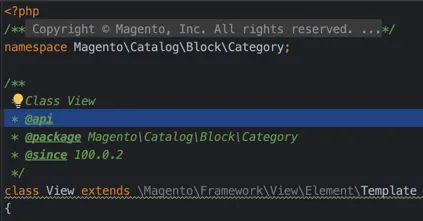
Magento 2.4.6 issues related to PHP 8
Magento 2.4.6 brought some issues with it, most of them from the PHP 8 upgrade. One of the major changes is that warnings are now treated as errors, which can be problematic for PHP functions that previously did not complain about nulls being passed instead of primitive PHP types.
This change can lead to unexpected behavior and errors in the code. Additionally, it is important to watch out for errors in analytics modules, as these modules are executed on all pages, including the critical checkout path. Any errors in these modules can cause significant issues for customers trying to complete their purchases.
Another issue to be aware of is that the New Relic agent does not support JIT. This can slightly degrade the performance of cron tasks and indexers. Our New Relic pricing guide for Magento covers the agent settings that keep its data volume down. There are few popular modules which were not initially compatible, but recently got updates to work with Magento 2.4.6 and PHP 8.2:
- Amazon Pay: amzn/amazon-pay-magento-2-module
- Klarna Payments: klarna/m2-klarna
Starting with Magento 2.4.5, Klarna Payments can only be enabled as a standalone module and must be obtained for free from the marketplace.
Performing the Upgrade and Testing Your Site
Once you have ensured that all of your extensions and customizations are compatible with Magento 2.4.6, it’s time to perform the upgrade. This process can vary depending on your hosting provider and the size of your store, but Magento provides detailed documentation and support to guide you through the process.
After the upgrade is complete, it’s important to thoroughly test your site to ensure that all functionality is working properly. This includes testing checkout, payment processing, and any custom features or integrations.
Watch the deploy output for indexer errors as well - if the pipeline stops on a message like sales_order_data_exporter view does not exist, the module state and deploy scripts have drifted apart, see our fix guide for that error.
It’s also a good idea to test your site’s performance and speed to ensure that it is running optimally. The Magento 2 performance optimization checklist lists what to measure and tune after an upgrade.
In case you need a help with upgrading your store to Magento 2.4.6, please contact us, and we will safely upgrade your store.
composer require-commerce magento/product-community-edition 2.4.6 --no-update --force-root-updates
composer update
If you’re using ElasticSuite, require the compatible version:
composer require "smile/elasticsuite":"~2.11"Remove the obsolete Mageplaza SMTP module:
composer remove mageplaza/module-smtpBonus: apply patched Magento 2 versions
Magento 2.4.6-p1 and 2.4.6-p2 introduced fixes to critical vulnerabilities. Read more in the release notes for p1 and release notes for p2.
Follow the similar composer commands as during the upgrade to apply the Magento 2 patched version:
composer require-commerce magento/product-community-edition 2.4.6-p2 --no-update --force-root-updatescomposer updateConclusion
Upgrading to Magento 2.4.6 offers several significant benefits, including support for the latest PHP versions, updated search engine options, and the removal of outdated Zend_* classes.
The new native SMTP configuration streamlines the process of configuring core ecommerce functionality, reducing the need for external third-party modules.
While dropping support for PHP 7.4 may be a concern for some users, the added support for PHP 8.1 and 8.2 ensures more performant code.
If you are looking to enhance the performance and functionality of your ecommerce platform, upgrading to Magento 2.4.6 is an investment that is definitely worth considering.
To hand the upgrade and the patches after it to a team, see our Magento upgrade service and ongoing support.
Frequently asked questions
Magento 2.4.6 upgrade
What PHP version does Magento 2.4.6 require?
Magento 2.4.6 no longer supports PHP 7.4 and recommends PHP 8.2. Stores still running PHP 7.4 need to move to PHP 8.1 or 8.2 before upgrading. New Relic monitoring supports PHP 8.2 since its PHP agent 10.7.0 release.
How do I upgrade Magento to 2.4.6 with composer?
Run composer require-commerce magento/product-community-edition 2.4.6 --no-update --force-root-updates and then composer update. If the store uses Smile ElasticSuite, require smile/elasticsuite ~2.11, which is the version compatible with Magento 2.4.6. The Mageplaza SMTP module becomes obsolete and can be removed with composer remove mageplaza/module-smtp.
How do I configure SMTP in Magento 2.4.6 without an extension?
Magento 2.4.6 and later include native SMTP configuration in the admin panel. Go to Stores > Settings > Configuration > Advanced > System and open the Mail Sending Settings tab. Enter the SMTP username, password and hostname, save the configuration and flush the Magento 2 cache.
What replaces Zend classes in Magento 2.4.6?
Magento 2.4.6 replaces Zend_Validate, Zend_Filter, Zend_Json and Zend_HTTP with their Laminas equivalents. Use classes from the Magento\Framework\Validator and Magento\Framework\Filter namespaces, and Magento\Framework\Serialize\SerializerInterface for JSON. The full list of deprecated classes and replacements is in restricted_classes.php inside the magento/magento-coding-standard package.
Which search engines does Magento 2.4.6 support?
Magento 2.4.6 supports ElasticSearch 8 and OpenSearch 2.5. OpenSearch is the default search engine for Magento Open Source, and the release is backward-compatible with OpenSearch v1. Smile ElasticSuite 2.11 is available for Magento 2.4.6.
Why do my theme templates break after upgrading to Magento 2.4.6?
Magento 2.4.6 upgrades the frontend library to jQuery 3, so theme and template overrides need a review. Self-closing tags such as <div /> or <p/> in HTML strings are read by the browser as opening tags, so every such tag must be closed explicitly. Deprecated calls such as $.ajax(...).success also throw errors and need to be updated.